Garage Billing Software That Makes Billing Fast and Accurate
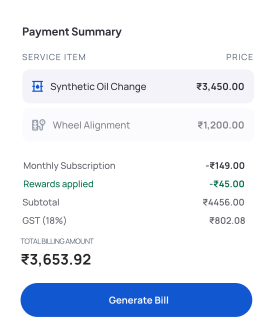
Create bills using services, parts, service packages, and reward redemption in one screen by simply searching the job card number or vehicle number, so all added details are fetched automatically and you get a clear, accurate bill without confusion using a reliable garage billing software.

Key Features Of Socioplace Auto Garage Billing Software
Manage Billing Without Missing Any Charges

Create Bill by Searching Job or Vehicle
Search using vehicle number or job card number to load all job details instantly, so you don’t have to enter anything manually and avoid missing any work done.

Auto-Fetch Service Details
Once the job is selected, all services added during the job are fetched automatically, so billing is faster and accurate.

Add and Update Services Easily
Review the services and adjust quantity if needed, so the final bill reflects the exact work completed.

Include Spare Parts in Billing
Add parts with price and quantity directly into the bill, so every item used in the job is included without missing any cost.

Add Service Packages
Select service packages like combos or plans during billing, so multiple services are included clearly and billing becomes more structured.

Apply Reward Redemption
Use customer reward points while billing, so customers get instant benefits and are encouraged to return again.

Automatic Total Calculation
Once services, parts, packages, and rewards are applied, the system calculates subtotal, GST, and final amount, so you avoid manual calculation errors.

Error-Free Tax on Every Invoice
Apply GST automatically to every invoice using your configured tax settings. Generate accurate tax calculations, reduce billing mistakes, and create professional GST-ready invoices without manual calculations.


Flexible Invoice Printing
Generate A4 or thermal invoices instantly. Whether you use a standard printer or a billing printer, print professional invoices quickly.

Before Socioplace Auto vs After Socioplace Auto
From Manual Billing to Clear Invoicing
Without System
 Manual billing → calculation mistakesSeparate records → missing detailsSlow process → customer waiting
With Socioplace Auto
 All details in one screen → accurate billingAuto calculation → no errorsFaster invoices → better customer experience
How Garage Billing Software Works
Complete Billing Step by Step
01
Search Job or Vehicle
Enter vehicle number or job card number to fetch all job details instantly, so you don’t have to enter services again and can start billing quickly.
step 01
02
Review Services and Add Parts
Check the services already added and include spare parts if needed, so the bill reflects the exact work done without missing any items.
step 02
03
Add Packages and Apply Rewards
Select service packages and apply reward points, so customers get the right benefits and billing becomes more structured.
step 03
04
Generate Final Bill
Create the bill with subtotal, GST, and final amount calculated automatically, so billing is completed quickly and without errors.
step 04
Why Garage Billing Software is Important
Instead of calculating bills manually or using separate tools, you can complete everything in one system.

No manual calculation errors

No missing service or part charges

Faster billing during busy hours

Clear pricing for every job
Built for Daily Workshop Billing
This garage billing software is designed for real garage work, so you can create bills easily without technical knowledge.

Simple billing process

Quick invoice generation

Easy to update details

Works for any garage
Start Garage Billing Without Errors
Create accurate bills by searching vehicle or job card details and fetching services, parts, packages, and rewards in one place, so your billing becomes faster, clear, and mistake-free with a reliable garage billing software.
