Garage Inventory Management Software That Keeps Your Stock Under Control
Add items with quantity, cost, and price in one place, so you always know what stock is available and avoid delays during work using a reliable garage inventory management software.

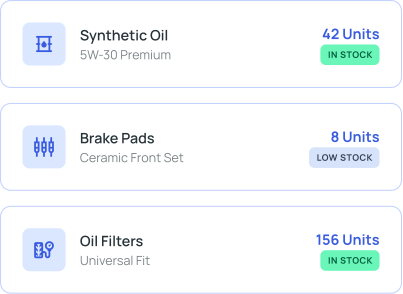
Key Features Of Socioplace Auto Garage Inventory Management
Manage Inventory Without Missing Any Stock Details

Add Items with Full Details
Enter item name, quantity, cost, and price while adding stock, so every item is recorded properly and ready to use during jobs.

Update Stock Anytime
Edit quantity, cost, or price whenever stock changes, so your inventory always stays accurate and up to date.

Track Quantity Clearly
View available quantities for each item, so you know what is in stock and avoid last-minute shortages.

Search Items Quickly
Search items by name to find them instantly, so you don’t waste time scrolling or checking manually.

View All Items in One Place
See all inventory items in a single list with quantity and pricing, so everything is organized and easy to manage.

Remove or Modify Items Easily
Update or delete items when needed, so your inventory stays clean and only contains valid stock data.
Before Socioplace Auto vs After Socioplace Auto
From Stock Confusion to Clear Inventory Control
Without System
 Stock managed manually → items get missedNo clear quantity → work gets delayedChecking stock takes time → slows down jobs
With Socioplace Auto
 All items stored in one system → nothing missedReal-time quantity → no stock confusionQuick search → faster job completion
How Garage Inventory Management Works
Manage Inventory Step by Step
01
Add New Item
Enter item name, quantity, cost, and price, so stock is recorded and ready to use.
step 01
02
Update Stock Details
Modify quantity or price when items are used or restocked, so your data stays accurate.
step 02
03
Search and Check Availability
Search items instantly and view quantity, so you can confirm stock before starting work.
step 03
04
Auto Update During Billing
When parts are used in billing, the quantity is reduced automatically in inventory, so your stock stays accurate without manual updates.
step 04
Why Garage Inventory Management Software is Important
Instead of checking stock manually or guessing availability, you can manage everything in one system.

No missing items

Clear stock visibility

Faster access

Accurate stock data
Built for Daily Workshop Inventory
This garage inventory management software is designed for real garage work, so you can manage stock easily without technical knowledge.

Simple item entry

Quick stock updates

Clear quantity tracking

Works for any garage
Start Managing Inventory Without Confusion
Add, update, and track all your items in one place, so your stock stays clear, accurate, and ready for daily work with a reliable Socioplace Auto garage inventory management system.
