Garage Job Card Software That Keeps Every Job Clear
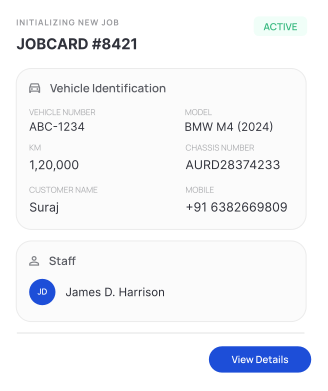
Start a job by entering the customer's mobile number or vehicle number. Add services, assign staff, and manage every repair from one place, so every job stays organized from start to finish.

Key Features Of Socioplace Auto Garage Job Card Software
Everything You Need to Manage Job Cards

Create Job Cards Instantly
Enter the customer's mobile number or vehicle number to start a job instantly, so you can begin repairs quickly without manually entering customer details.

Auto-Fill Customer Details
When an existing customer comes, details are filled automatically, so you can start the job faster without asking the same information again.

Add Services Easily
Select required services and quantity for each job, so the work is clearly defined and billing becomes easy later.

Assign Staff to Jobs
Choose staff while creating the job, so everyone knows their responsibility and work gets completed without confusion.

Track Job Status Clearly
Check whether a job is pending, in progress, or completed, so you always know what work is left and what is done.

View Recent Jobs Quickly
See recently created job cards in one list, so you can quickly access and continue work without searching.

Complete Vehicle Check-In
Record customer details, vehicle number, odometer reading, fuel level, and service remarks before starting work, helping your team stay organized throughout every repair.
Before Socioplace Auto vs After Socioplace Auto
From Confusion to Clear Workflow
Without System
 Jobs written on paper → work gets missedNo tracking → delays in completionRepeated questions → slower service
With Socioplace Auto
 All jobs tracked → no missed workClear status → faster completionCustomer details ready → quick service
How Garage Job Card Software Works
Create and Manage Jobs in Simple Steps
01
Add Vehicle Details
Enter vehicle number and basic details to start the job, so every vehicle is recorded properly.
step 01
02
Select Services
Choose services and define the work, so there is no confusion about what needs to be done.
step 02
03
Assign Staff
Allocate the job to staff, so work responsibility is clear from the beginning.
step 03
04
Submit and Track
Save the job and track progress anytime, so you stay updated without checking manually.
step 04
Why Garage Job Card Management is Important

No missed job details or confusion

Faster job handling during busy hours

Clear tracking of all ongoing work

Better coordination between staff
Built for Daily Workshop Use
This workshop job card software is designed for real garage work, so you can start using it without training.

Easy to understand

Quick job creation

Works for any garage size

No technical knowledge needed
Start Managing Jobs Without Confusion
Create and track every job in one system, so your daily work becomes faster, clearer, and more organized with this garage job card software.
